Nota Justa › Guides › Negative marking in Google Forms
Negative marking in Google Forms, step by step
Nota Justa is a Google Forms add-on that takes marks off for wrong answers, like the real exam. It's for teachers, coaching centres and exam coaches who run multiple-choice mock exams in Forms.
How it works
1Open your quiz on a computer and paste the two files into its Apps Script.
2Open Nota Justa from Extensions and choose what each wrong answer costs.
3Each response is rescored on submit. You release the marks when you want.
It doesn't: write your questions, change the marks of grid or open questions (Forms scores them as usual), or work from the phone app.
Google Forms gives 0 for a wrong answer, the same as a blank one. Nota Justa takes off what your exam takes off: +4 / −1, −1/4, −1/3 or your own rule.
In a JEE- or NEET-style paper, each right answer is worth +4 and each wrong answer takes off 1. Take 90 questions with 50 right, 20 wrong and 20 blank:
How it's marked
Score
Mark out of 10
Google Forms, no negative marking
50 of 90
5.56
+4 / −1 (4 × 50 − 20)
180 of 360
5.00
With 1-point questions, Nota Justa takes a quarter of a point off for each wrong answer, so Forms shows 45 of 90. With Pro, the panel and results sheet can show the mark in the exam's own points: 180 of 360.
Other common rules
Rule
60 right, 30 wrong, 10 blank
Mark out of 10
No negative marking (Forms)
60
6.00
−1/3 per wrong answer
60 − 30 ÷ 3 = 50
5.00
−1/4 per wrong answer
60 − 30 ÷ 4 = 52.5
5.25
With 4 options per question, −1/3 makes a pure guess worth 0 on average; with 5 options, −1/4 does. Try any rule in the negative marking calculator.
How to set it up, in 5 steps
Set up the quiz in Forms
In Settings, turn on Make this a quiz. Then, in each question, open Answer key, mark the right answer and give it its points.
Install Nota Justa in that form
You install it by pasting two files into the form's Apps Script. The install guide walks you through it, with the screens you'll see.
Choose what each wrong answer costs
Open Nota Justa from Extensions and pick the rule: one third of a question, one quarter, your own deduction or, with Pro, +4 / −1.
Click “Turn on marking”
Nota Justa rescores the responses you already have, and from then on every new response is marked as soon as it arrives.
Release the marks when you want
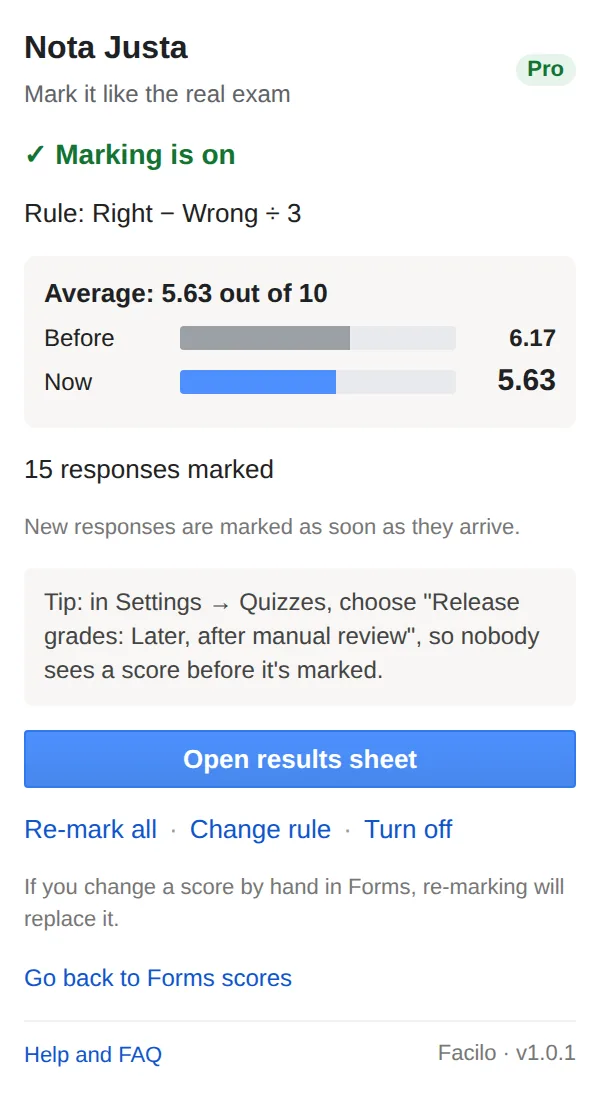
Your students see their Forms score with the wrong answers already taken off. Tip: in Settings › Quizzes, choose “Release grades: Later, after manual review”, so nobody sees a score before it's marked.
The Nota Justa panel after turning marking on (sample data): the group average out of 10, before and after.
For coaching centres
With Pro or the Academy plan, every mock exam leaves you a results sheet with each student's mark, the group ranking and the questions missed most. The Academy plan covers up to 20 teachers with one key.
Price: free on all your forms, with no response limit, using −1/3, −1/4 or your own deduction. Pro, at 29 € a year or 4 € a month, adds every rule (+4/−1 included), your own scale and pass mark, and the results sheet. Academy: 79 € a year for up to 20 teachers.
Questions
What people ask us
Can Google Forms take marks off for wrong answers?
Not on its own: Forms adds up the points for right answers and gives 0 to wrong and blank ones. Nota Justa adds the missing part: after each submission it takes off the share you chose for each wrong answer and writes the score in Forms.
Does it work on a quiz that already has responses?
Yes. When you turn marking on, Nota Justa rescores every response the form already had.
Do my students need to install anything?
No. They answer the form as usual. Only you install Nota Justa, on a computer.
What about grid and open questions?
They keep the score Forms gives them: Google doesn't let add-ons change the score of a grid. Multiple-choice questions are marked with your rule.
How much does it cost?
It's free with −1/3, −1/4 or your own deduction, on all your forms, with no response limit. Pro is 29 € a year or 4 € a month and adds +4 / −1 and the other rules, your own scale and the results sheet.
What happens to my students' data?
Everything happens in your Google account. We have no servers that receive, store or analyse your students' responses, names or email addresses, we do not sell them, we do not share them and we do not use them for advertising. Privacy